To sell on Etsy, choose an eligible product, create your shop, connect payments, and publish a listing that clearly explains what buyers receive. Then check your costs and fulfill orders reliably before expanding your range.
Start with an offer you can manage, clear delivery details, and a price that covers your costs. A small catalog is enough to get going. Work through shop setup first, then turn a printable planner into a listing buyers can understand at a glance. Use the weekly schedule to decide what to tackle in your shop this week.
How to sell on Etsy: how it works
Buyers purchase what you offer in your Etsy listing, and Etsy Payments handles checkout. You’re responsible for delivering what you promised: making or arranging production and shipping for physical products, or supplying the advertised files for digital downloads and helping buyers understand how to access and use them.
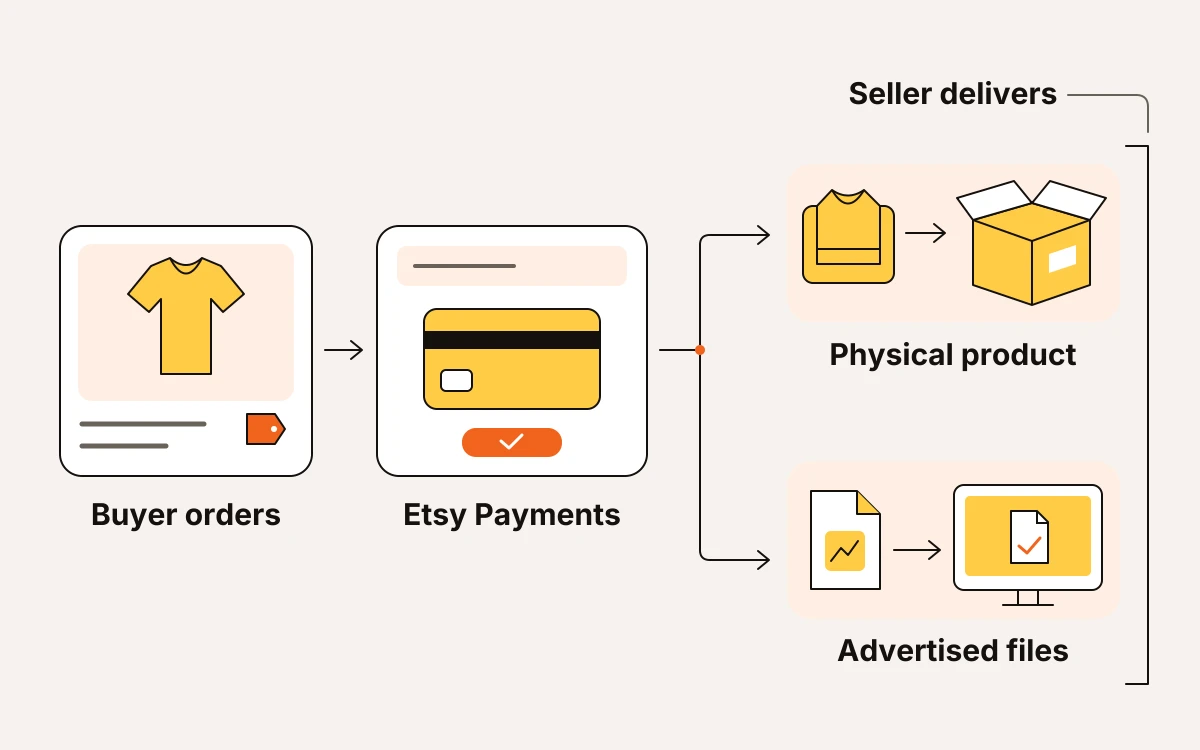
Check these responsibilities before you publish:
- Etsy allows items you make, design, handpick, or source within its permitted categories. Check Etsy’s Creativity Standards for the current rules. If you’re selling resale products, check that they qualify before you list them.
- Search helps buyers find your listing. Clear photos, product details, and delivery expectations help them decide whether it fits. Getting found and earning the order are separate jobs.
- Etsy Help says Etsy doesn’t require a business license, but you must follow applicable laws for small businesses selling online. Check your local registration, licensing, and tax obligations separately.
Choose your first offer: where to start
If you already have listings, fix the first problem buyers run into when finding or understanding your product before adding more. If you’re starting fresh, choose a product you can make, explain, and deliver without building a whole collection.
- Starting fresh? Choose one buyer, one use case, and a manageable format. Say you sell printable planners for shift workers: start with a weekly shift-and-meal planner rather than a bundle covering every part of their lives. Finish the file and check that it prints clearly before designing matching products.
- No views? Check relevance first. Make sure your listing names the product in words your intended buyer would use. A clever collection name won’t explain what’s for sale. Compare the searches you’re targeting with what the listing actually offers before expanding into another niche.
- Views without orders? Check whether your offer is clear. Start with the first photo: can buyers understand the product and tell what they’ll receive? For digital downloads, make the format and download delivery obvious. Then check the price and purchase instructions before rewriting tags.
Open your shop on desktop, then manage it in the app
Before preparing your storefront, check whether Etsy Payments is available in your country. You can only open a shop where it’s available; Etsy Help publishes the current eligibility and setup requirements.
Work through setup in this order:
- Create an Etsy account. You need one before creating your shop. Then use a desktop web browser, visit Etsy.com/sell, and select Get started.
- Choose your shop language carefully. Pick the language you’re comfortable using with buyers. You can’t change your shop’s default language later, though you can add other languages after opening.
- Check your shop currency against your bank currency. If they differ, currency conversion fees may apply. Choose your currency before setting prices so conversion costs don’t become a surprise deduction.
- Choose a shop name that meets Etsy’s requirements. It must be 4–20 characters, with no spaces, special characters, or profanity. It must also be unused by an existing Etsy member and must not infringe on someone else’s trademark. Check the name before building your branding around it.
Complete the initial setup on desktop. Once your shop is open, you can manage it through the Etsy Seller app.
Connect payments and budget for selling costs
Connect your payment details before setting your final prices, and budget for the costs that come out of each sale. Selling on Etsy isn’t free, even when your product is a digital download.
- Connect your bank and billing card. Add a bank account to receive money through Etsy Payments and a debit or credit card to pay Etsy bills.
- Prepare matching identification. Your government ID must be unexpired, and its name must match the name on your bank account. Complete verification with a photo of that ID and a clear selfie.
- Enable two-factor authentication. Etsy requires it; choose verification codes through an authenticator app, SMS, or a phone call.
- Budget for the setup charge. After adding billing information, you must pay a one-time, non-refundable shop set-up fee. Use the amount Etsy displays during your setup rather than a fixed amount from someone else’s walkthrough.
Before publishing, write down your selling price, Etsy fees, and fulfillment costs. If you sell print on demand, include production and shipping. For digital downloads, account for software and the time you spend creating and supporting the product.
Keep advertising charges separate from ordinary selling costs. If you run Etsy Ads, budget that spending separately rather than treating it as a fixed fee on every order. Check whether Offsite Ads participation is optional for your shop and calculate what an attributed order would leave after its advertising fee. Etsy Help publishes the current participation rules and rates.
Build a listing that explains the product and delivery
Your listing should make clear what arrives, what the buyer can choose, and how they’ll receive it. Fix missing contents and delivery details before polishing keywords.
- List what’s included, dimensions or sizes, available colors, and any personalization. If a preview shows props or accessories that aren’t included, say so.
- For print on demand, identify your production partner and explain their role in making your design. Set a processing time that reflects production, and keep it separate from shipping time. Your previews should match the actual product, print placement, and available options. If a mockup makes the design look larger than it prints, fix it.
- For digital downloads, say whether buyers receive ready-to-use files or a document containing an editable template link. Name the file formats, explain how buyers access them, and state that no physical item ships. For Canva templates, disclose any account or paid-element requirements. Check Canva’s current licensing terms before selling; access to an asset isn’t permission to resell it.
- Give buyers the instructions they need: what personalization details to submit, what they can edit, and how to print or use the finished file.
Use shop sections to separate distinct offers, such as printable planners and editable templates. Before publishing, read the listing alongside its previews. If they imply different contents, options, or delivery, correct the mismatch first.
A worked example: turn a printable planner into a clear offer
Say you sell… an undated printable vegetable-garden planner. Make the format and purpose obvious in your listing: buyers get a PDF to print themselves, not a bound gardening notebook.
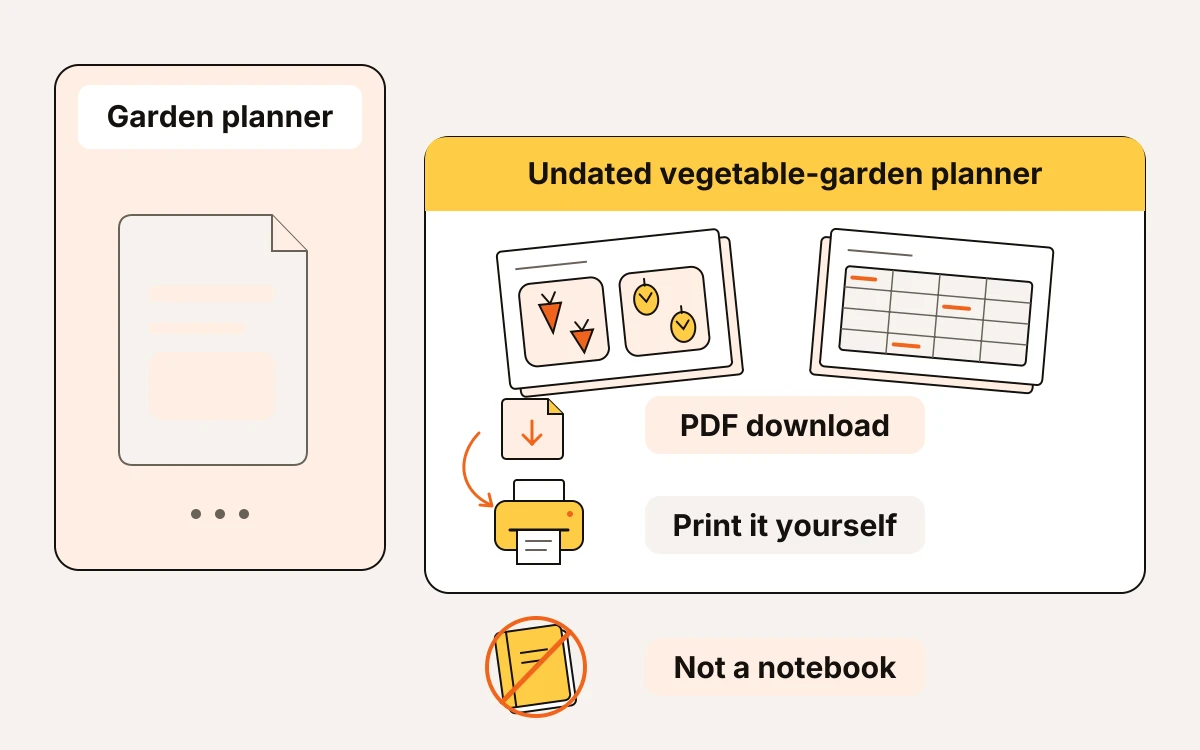
Compare “garden planner” with “printable vegetable garden planner” using eMarketInsight’s free keyword research tool. Check demand, competition, prices, and top sellers. Etsy search numbers are estimates, not published search volume; the tool reads demand from how listings are viewed, favorited, and bought.
If the broad phrase brings up products unlike yours, use the narrower phrase to describe your offer. Don’t add “editable” or “personalized” just because those words appear in popular listings.
Title: “Printable Vegetable Garden Planner PDF, Undated Planting Log.”
Build the files and listing around this offer:
- Include a garden-bed planning sheet, seed-starting log, planting log, and harvest notes. Show each sheet in the previews.
- Supply clearly labeled US Letter and A4 PDFs. Print-check both before publishing.
- State near the start: “Digital download only. No physical item will be shipped.”
- Tell buyers to download the PDFs from their Etsy purchases in a web browser, choose the file matching their paper size, and print at actual size.
- Explain that the planner is undated and intended for handwriting after printing. It isn’t an editable template.
Use these 13 relevant tags as a starting set, then review them against your keyword research: garden planner, vegetable planner, printable planner, garden planner pdf, planting log, seed starting log, harvest journal, garden bed planner, undated planner, gardening printable, vegetable gardening, A4 garden planner, garden journal.
Before publishing, check that the title, preview sheets, description, and uploaded files all describe that same offer.
Your shop checklist for this week
This week, clear the bottleneck holding you back and publish or revise one listing. Put each task on your calendar so shop work fits around your other commitments.
- In your first work session, name the unfinished task holding you back: verification, pricing, files, or delivery details. Then complete it.
- In your publishing session, publish or revise your listing. Open the download files or check your print-on-demand order routing and processing time.
- Before adding products, schedule time to answer messages and handle fulfillment. Get the current offer manageable first.
- At the end of the week, record what you changed, when you changed it, views, and orders. Use that record to choose next week’s task before chasing Star Seller.