Start with free Etsy SEO tools for keyword research, listing checks, and search trends. Pay when research limits or repetitive listing work slow you down. Choose based on the job you need done: finding better search phrases, fixing existing listings, or speeding up your workflow. A longer feature list won’t help you choose.
Free tools and paid options are grouped by those jobs, so you can see when an upgrade is worth paying for. Say you sell printable wall art. That example walks you through the choices and gives you one useful task for your shop this week.
What SEO tools can tell you—and what Etsy decides
Tools suggest keywords: words and phrases buyers use to search. Etsy compares buyers’ searches with your listing keywords to judge how well they match. Your job is to choose phrases that describe what you actually sell.
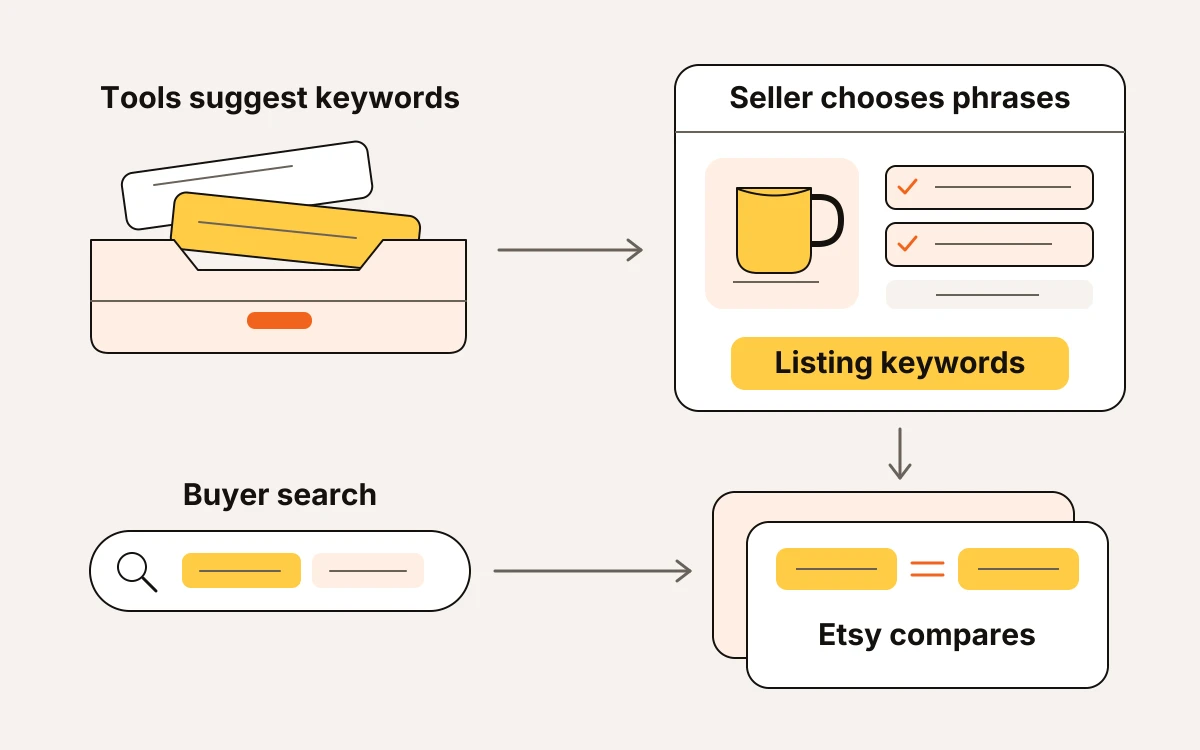
Keyword research helps you choose search phrases. Listing automation writes and publishes text across products. Listing checks help you review the text you already have.
Search volume figures, which show how often people search for a phrase, are estimates. Tools can measure search activity in different ways. If their numbers disagree, stick with phrases that accurately describe your product. The tool showing the biggest number shouldn't decide which phrase you use.
Choose your first tool by the problem you're seeing
Choose your first tool based on what’s holding up a sale: getting relevant buyers to your listing, helping them choose, or saving drafting time. Work down this list and pick the first situation that fits.
- Few relevant visits? Start with keyword research and competition. Look for phrases that describe your product, then weigh buyer engagement and competition alongside search volume. A dedicated keyword tool fits if you’ll write listings yourself.
- Visits without orders? Check photos and pricing before adding keywords. Your first photo should make the product clear, and your price should make sense next to comparable listings. If buyers can’t tell what you’re offering, more visitors won’t fix that.
- A sudden drop on a seasonal listing? Check search trends. A phrase that peaks in December can fade by March. If interest has cooled, put products suited to the coming season first.
- Repetitive drafting taking over your week? Consider listing automation. It can help you apply phrases you already know fit your products. If you’re still deciding what buyers want, settle that before automating the drafting.
Free Etsy SEO tools, grouped by the job they do
Research: find a direction and compare listings
| Tool | Output | Suitable seller | Resulting decision |
|---|---|---|---|
| Etsy Niche Finder | Search phrases marked as having better chances and less competition, based on a keyword you enter | You’re narrowing a broad product idea | Choose a phrase that fits your product to check before making another design |
| Etsy Search Trends | Charts of daily keyword searches and sales, showing changes and busiest days | You sell seasonal products or need to plan when to publish listings | Focus on products whose buying season is approaching |
| Etsy Ranking Checker | Listings that appear for a keyword, with prices, shops, sales, and revenue (money from sales); highlights your shop | You need to see which products appear for your target phrase | Keep the phrase if the results match your product, or look for a closer match |
| Etsy Shop Analyzer | Shop profile, active listings, reviews, best sellers, growth, and estimated money from sales | You’re comparing shops that serve similar buyers | Choose which products deserve a closer comparison |
Start with the Niche Finder if you need to narrow your options. Search Trends then helps you judge the timing. Once you’re ready to compare specific listings and shops, use the Ranking Checker and Shop Analyzer.
Checks: review what you’ve written
An Etsy listing checker points out parts of an existing listing to review. Title and tag checkers focus on those fields before you publish or make changes. Tags are the search terms you add to your listing. Fix the issues that apply to your listing.
Free research allowances versus always-free checkers
eMarketInsight offers 3 free previews daily without an account. A free account gets 3 full lookups daily before email confirmation and 5 afterward. Its title and tag checkers are always free. Using them doesn’t count toward those research limits.
This week, pick one research question and save the findings that help answer it. Then check the wording you plan to publish. If you’re still comparing product ideas, use your free research lookups for that first. Polishing titles can wait until you’ve chosen the products.
When paid research or listing automation earns its place
A paid plan earns its place when it solves a problem that keeps slowing you down.
| Paid option | When it earns its place | When to stay free |
|---|---|---|
| More research capacity | Your regular product research keeps hitting the free plan’s limits. | You can finish your comparisons within those limits. |
| Tools that write and publish listings in bulk | Repeated listing tasks delay products you’ve already researched. | You’re still choosing products or only updating occasional listings. |
eMarketInsight’s Free plan costs $0. Starter costs $9 a month for 1,000 research lookups daily. Pro costs $29 a month for 4,000 daily, and Business costs $100 a month for 12,000 daily. Etsy and Amazon research share the daily allowance. Choose the plan that covers the comparisons you need to finish. Promised rankings aren’t a reason to upgrade.
With listing automation, review the product details and wording before publishing.
Before subscribing, write down:
- Which task stopped because of a limit?
- Does that task keep coming up?
- Will the paid option remove that specific delay?
If you can’t name the blocked task, keep your money this month.
A printable wall-art listing: turn research into one decision
Say you sell printable botanical wall art. Use your research to choose one phrase for the start of your title. You don’t need to squeeze in every keyword, or search phrase.
Compare “botanical wall art” with “printable botanical wall art” in eMarketInsight’s Etsy Keyword Research Tool. Look at demand (buyer interest) and competition (other listings using the phrase). Then review opportunity (the chance to compete), prices, and top sellers.
The broader phrase names the subject. The longer phrase also tells buyers they’ll get something to print. Look at the products shown for each phrase, too. Downloadable files are a closer match to your listing than framed prints shipped to buyers.
If buyers search for the printable phrase and competing products are downloads, lead with it. If buyer interest looks weak, compare another phrase that accurately describes your download before changing the listing. Don’t choose the broader phrase just because more buyers search for it.
For a matching set of three green leaf designs, draft:
Printable Botanical Wall Art Set, Three Green Leaf Prints
The buyer sees the main phrase first, then what’s included in the set.
Before publishing:
- Confirm that the artwork matches every detail in the title.
- Use relevant search phrases in your tags, leaving out unrelated styles or subjects.
- Make it clear in the description that the buyer receives digital files, not physical prints.
Keep this change focused on the title. Use what you found to name both the artwork and its format.
Build a small tool kit and use it this week
This week, pick one listing or product idea from your own shop, choose the tool that answers your current question, and record the decision it helps you make.
- Bookmark the tool that answers your current question. Skip subscriptions that duplicate a job you already cover.
- Use the result to choose your next step: edit a listing, schedule a seasonal product, or automate repeated drafting.
- Record the date, the listing or product idea, what the tool found, and your decision. For automation, note the time spent drafting and reviewing.
- Set a date to review the result. Compare views and orders after listing changes, search interest for seasonal plans, or drafting time for automation.